 The Fine Print: AI Training and the Unavoidable Truth of Email History
As senior sysadmins, we have to be brutally honest about data privacy. Your excellent point about AI training and the historical reality of government surveillance adds critical context to the discussion of unencrypted email storage.
I’ve updated the blog entry to include these important sections and a brief history of cryptography to illustrate how far we’ve come—and how far we still have to go.
 Mail Mayhem: How Your ISP Handles and Stores Your Unencrypted Email (Updated)
Hello fellow tech enthusiasts! As a senior sysadmin, I want to pull back the curtain on something you use every single day: email. Specifically, let’s explore what happens to your email once it leaves your client and lands on your Internet Service Provider’s (ISP) servers, paying close attention to data storage both locally and remotely.
The central point to understand is: Email data is almost always stored unencrypted on the ISP’s servers. This is a fundamental operational necessity for indexing, searching, scanning, and serving the mail back to you via protocols like IMAP.
The Journey: Bob Emails Alice
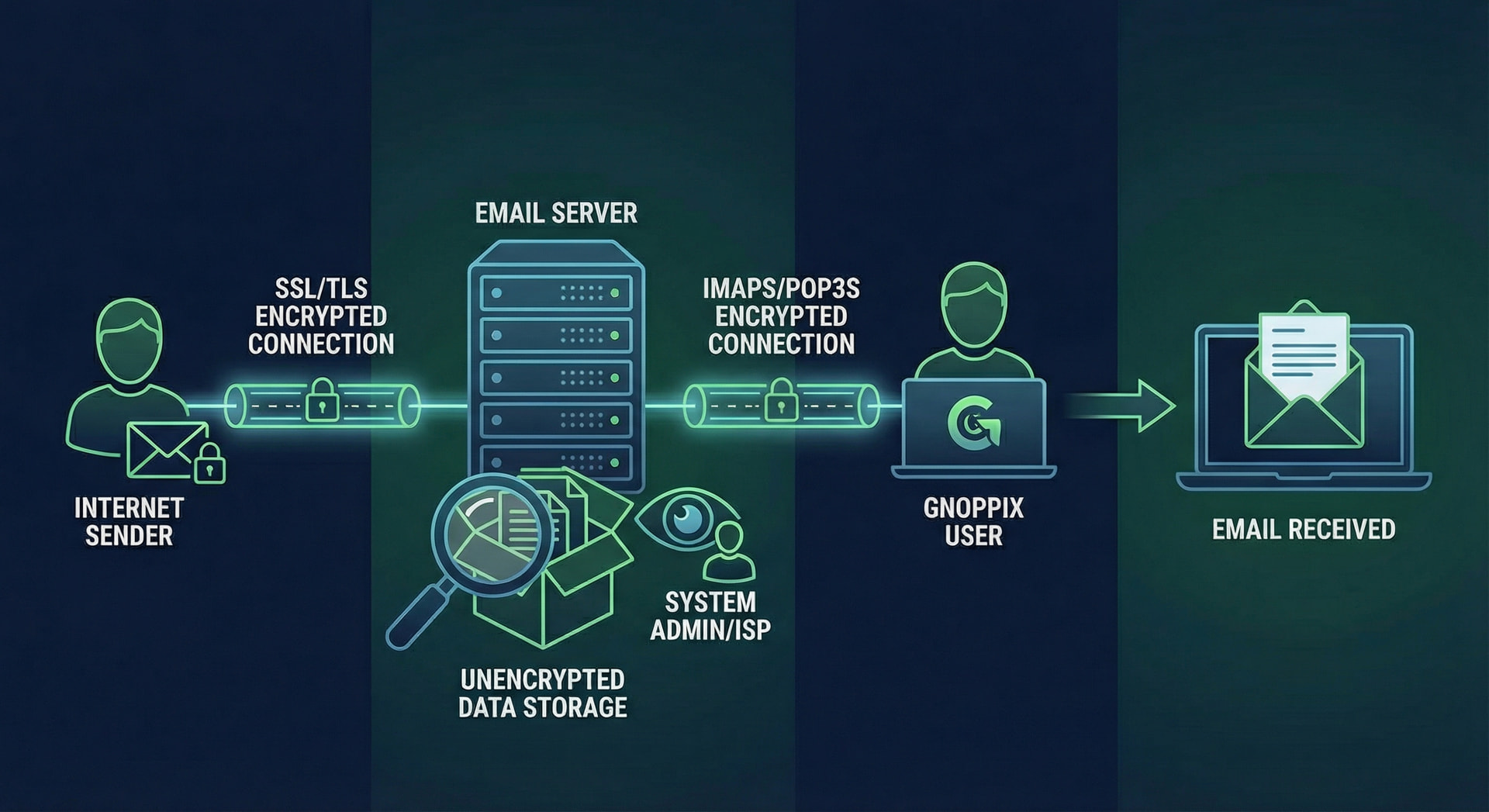
Let’s trace an email from creation to its final resting place, using our example users, Bob and Alice.
1. Bob Composes (Local Storage)
- Bob’s Action: Bob opens his email client (like Outlook or Thunderbird) and sends an email to Alice.
- Local Storage Impact:
- Before sending, a copy of the message (usually in the Drafts folder) is saved on Bob’s local machine.
- Once sent, a copy is immediately saved to the Sent Items folder on Bob’s local machine.
- File Format: If Bob is using Microsoft Outlook with a traditional setup, this data is saved into a PST (Personal Storage Table) file. If it’s a single email file he saves to his desktop, it’s an .MSG file.
2. The Transfer (SMTP)
- Bob’s client connects to his ISP’s Outgoing Mail Server (MTA/MSA) using the Simple Mail Transfer Protocol (SMTP).
- The email is transmitted. While STARTTLS should encrypt the connection (the pipe), the content of the message itself is still in plain text at this point.
3. Alice’s ISP Receives and Processes (Remote Storage)
- Bob’s ISP transfers the message to Alice’s ISP’s Incoming Mail Server.
- This server performs critical steps:
- Filtering: It checks for spam, viruses, and applies any security policies (e.g., DKIM/SPF checks).
- Delivery: Once validated, the server moves the message into Alice’s personal mailbox on the mail server’s file system.
Data Storage Formats: Local vs. ISP
On the sysadmin side, we primarily deal with three major file formats, though their use case often splits between local client storage and server-side storage.
| Format | Full Name | Primary Use Case | Storage Type | Encryption Status |
|---|---|---|---|---|
| PST | Personal Storage Table | Client-side for Microsoft Outlook. | Proprietary file that stores entire mailboxes (emails, calendar, contacts). | Can be password protected, but not true encryption against a sysadmin with access. |
| .MSG | Microsoft Outlook Message | Client-side for single messages. | Single file containing a message’s content and headers. | Always unencrypted unless manually encrypted before saving. |
| Maildir | Mail Directory | Server-side for modern ISPs/MTAs (e.g., Postfix, Dovecot). | A directory structure where every single email is a separate, distinct file. | Stored unencrypted on the server’s hard drive. |
Why Maildir is the ISP Standard
Modern, robust mail systems (like those built on Postfix, Dovecot, or Exchange) overwhelmingly prefer the Maildir format, or a similar database structure, over older formats like MBOX.
- Atomic Delivery: Since every email is its own file, delivery is atomic and safe. The system just writes a new file.
- No File Locking: Many clients accessing the same mailbox simultaneously doesn’t cause corruption issues because they aren’t all writing to one giant file.
- Efficient Indexing: It’s much faster for a sysadmin to troubleshoot or for the IMAP server to search Alice’s mail when all 10,000 emails are individual files.
 The Hidden Cost of “Free” Mail: AI Training and Historical Scanning
The security and privacy concerns surrounding unencrypted storage are compounded by two critical modern realities and one historical fact.
1. Consent to AI Model Training
When you use hosted email services (like Gmail, Outlook.com, or others), you have almost certainly agreed in the Terms of Service that your data can be scanned and used. In the current technological landscape, this often includes using your email content (after being anonymized or scrubbed of personally identifiable information where possible) to:
- Train modern AI models for tasks like improving spam filters, categorizing emails, providing smart replies, and enhancing the overall search and performance of the email service.
- Develop new features driven by machine learning algorithms.
2. Historical Reality: Authorities Were Scanning Email
For those of us who have been around since the early days of the internet (before encryption like SSL/TLS became standard), it was an open secret:
- No Encryption: Early email protocols were designed for a trusted, academic network (ARPANET), not the commercial internet. The message content traveled in plain, unencrypted text.
- Unavoidable Scrutiny: Long before sophisticated AI filtering, authorities and intelligence agencies had the technical capacity and, often, the legal authorization to intercept, scan, and store vast amounts of electronic communication flowing across network backbones. The practice of keyword scanning or content filtering has been a reality since the beginning of the commercial internet.
 A Brief History of Cryptography: From Clay to Quantum
The desire for privacy is not new. The history of encryption shows a constant “arms race” between those who want to hide information and those who want to discover it.
| Era | Method | Concept | Security Level | Sending Method |
|---|---|---|---|---|
| Ancient (~100 BC) | Caesar Cipher | A Substitution Cipher (e.g., A becomes D, B becomes E). | Very weak, easily broken by frequency analysis. | Sent via courier on parchment, scroll, or stone. |
| Medieval (16th Century) | Vigenère Cipher | A Polyalphabetic Cipher that uses a keyword to shift the letters, making frequency analysis much harder. | Considered unbreakable for centuries until cracked in the mid-1800s. | Sent via diplomatic courier or specialized messengers. |
| Early Modern (WWII) | Enigma Machine | An Electromechanical Rotor Machine that provided exponentially more complex substitutions. | Broken by the combined ingenuity of cryptanalysts (like Alan Turing) using early computing methods. | Encrypted text transmitted by radio/Morse code, then typed out. |
| Modern (1970s - Present) | RSA / ECC | Public Key Cryptography (Asymmetric Encryption). Uses one key to encrypt (public) and a different key to decrypt (private). | The foundation of secure communication (TLS/SSL, PGP), relying on the complexity of factoring large prime numbers. | Data sent over the Internet, secured by protocols like HTTPS/TLS. |
| Future | Post-Quantum Cryptography (PQC) | New algorithms designed to resist attacks from fault-tolerant Quantum Computers, which could theoretically break RSA/ECC. | Active research and standardization (e.g., NIST), based on problems like Lattice Theory. | Will be integrated into existing and new internet protocols. |
Key Takeaways for Users
- Local vs. Remote: Your mail client stores copies in a local format (like PST). The ISP stores the canonical copy in a server format (like Maildir).
- Unencrypted Reality: Treat every email you send as a postcard. Assume that if someone gets access to the mail server’s storage, they can read the content.
- AI Training is the Fee: For hosted services, you are trading your data (via the ToS) for a “free” or cheap service. Assume your mail is contributing to AI models.
- Use PGP/S/MIME: If you truly need privacy for a message, use end-to-end encryption like PGP or S/MIME. This encrypts the content of the message before it leaves your client, so it remains gibberish even on the ISP’s server and in their training data.
Stay safe out there, and remember that privacy requires active steps in the modern digital world!