I’ve told you the hard truth: your email is stored unencrypted on your ISP’s servers. I’ve also highlighted the latest critical privacy concern: major email providers like Google (Gmail) and Microsoft (Outlook.com) are using your unencrypted content which you agree to in the fine print to train their sophisticated AI and machine learning models.
This is the moment for action. Knowing the risks means we can and must take the necessary steps to protect our data. The industry-standard solution for true end-to-end email security is PGP (Pretty Good Privacy).
The Unbreakable Defense: How PGP Changes Everything
PGP, or its open-source equivalent GnuPG (GPG), provides end-to-end encryption and is the only effective defense against passive surveillance, server compromise, and unauthorized AI scanning of your email content.
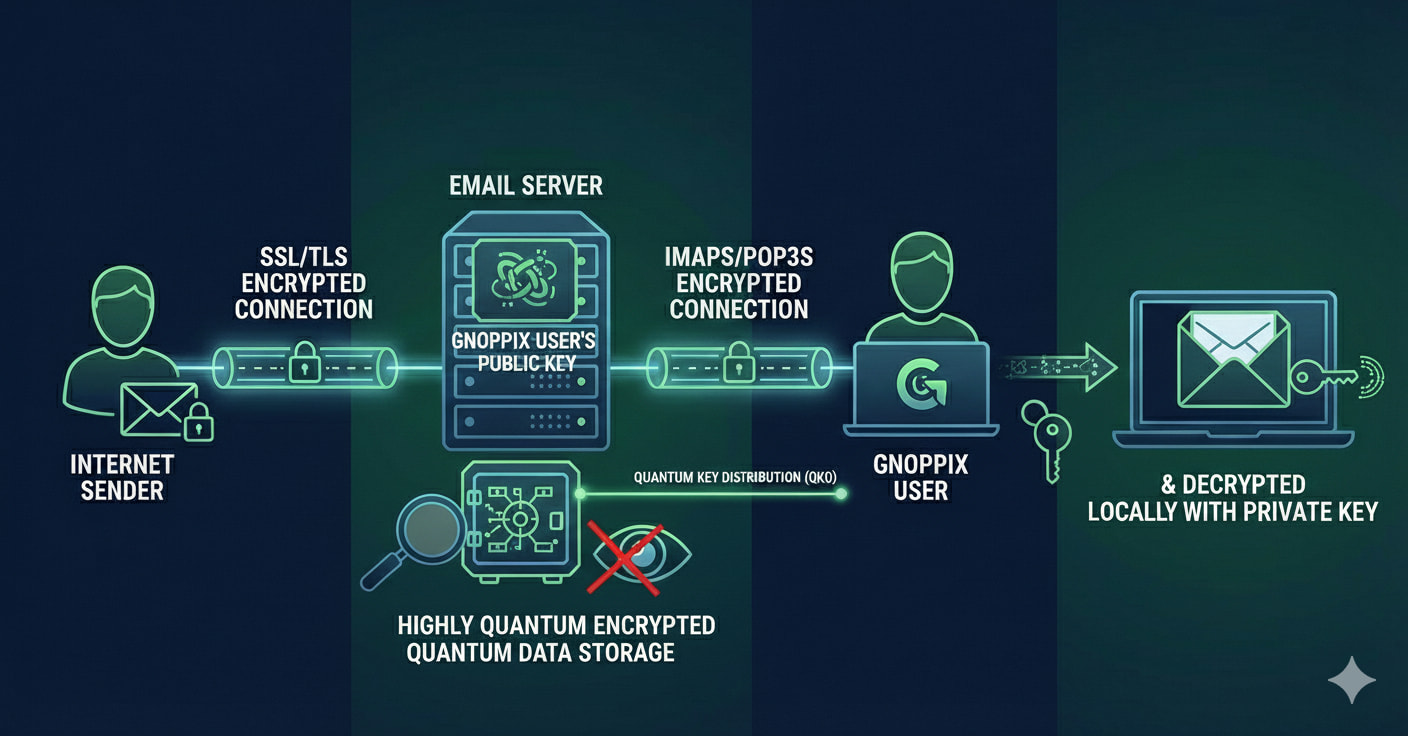
1. The Critical Shift in Storage
When you use a PGP-enabled email client (like Thunderbird with Enigmail, or an Outlook plugin) to send a message, the workflow changes completely:
-
Before Transmission: The plaintext message is encrypted on Bob’s local computer using Alice’s public key.
-
During Transmission: The entire message body is transmitted as an unintelligible block of encrypted text (ciphertext).
-
ISP Storage: The encrypted block lands in Alice’s mailbox on the ISP’s server (e.g., in a Maildir file). This file is now worthless to the ISP, their AI, or an unauthorized party. It’s a string of random characters, secured by strong cryptography.
-----BEGIN PGP MESSAGE-----
Version: GnuPG v1
hQEMA60l…[thousands of lines of ciphertext]…kQE
=k2sV
-----END PGP MESSAGE----- -
Decryption: Only when Alice accesses this file and her client uses her private key is the content decrypted and made readable.
2. Your Mailbox is Now Encrypted (On the Server)
Let’s address the core sysadmin storage concern directly.
| Scenario | Data Stored on ISP Server (Maildir) | Visibility to Sysadmin/AI |
|---|---|---|
| Standard Email (Unencrypted) | The entire plaintext message. | Fully Visible (Used for AI training, search, etc.) |
| PGP Encrypted Email | An opaque block of ciphertext. | Ciphertext (Unintelligible, secure) |
By implementing PGP, you are effectively encrypting your mailbox on the ISP side, regardless of the server-side file format (Maildir, MBOX, or a database). The ISP stores the digital equivalent of a locked safe, and only you hold the key.
 The Power of Strong Ciphers
PGP uses a combination of symmetric and asymmetric cryptography, and you should always ensure your implementation uses robust, modern ciphers.
The encryption process relies on Symmetric Ciphers to quickly encrypt the bulk of the message and Asymmetric Ciphers (RSA or ECC) to securely exchange the session key.
Strong, modern ciphers you should be using include:
- Symmetric: AES-256 (Advanced Encryption Standard with a 256-bit key). This is the current gold standard, used by governments and financial institutions.
- Asymmetric: RSA 4096-bit or Elliptic Curve Cryptography (ECC) keys of 256-bits or higher. These keys protect your private key and are computationally infeasible to break with current technology.
The Action Plan: Implementing PGP/GPG
Integrating PGP into your workflow is easier than you think and offers immediate, powerful security.
- Generate Your Key Pair: Use a tool like GnuPG (GPG) to generate a public and private key pair.
- Protect Your Private Key: Your private key is your master defense. It must be secured with a strong, unique passphrase. Never share it.
- Share Your Public Key: Your public key can be shared widely (e.g., posted on your website, or uploaded to a public key server). This is the key people use to encrypt messages to you.
- Install a Client Plugin: Integrate the PGP software with your email client:
- Mozilla Thunderbird: Use the built-in PGP support.
- Microsoft Outlook: Use a well-regarded third-party plugin.
Conclusion: Using a hosted email service is often necessary, but it does not mean surrendering your privacy. By adopting PGP/GPG with strong ciphers like AES-256, you ensure that the data stored in your remote mailbox is nothing but ciphertext, effectively shutting the door on passive AI scanning and safeguarding your communications from anyone without your private key.
When an email is encrypted using
PGP (Pretty Good Privacy), the message content is encrypted before it leaves the user’s computer. The Internet Service Provider (ISP), or the email provider’s servers, stores the email exactly as it receives it: as an undecipherable block of encrypted data.
Here is a breakdown of how this process works and what it means for ISPs:
The PGP Encryption Process
PGP uses a hybrid encryption scheme involving both symmetric and asymmetric (public-key) cryptography.
- Encryption on the Sender’s Device : The sender uses their Gnoppix email client to encrypt the email content using a one-time random symmetric “session key”.
- Key Protection: The session key itself is then encrypted using the recipient’s public key, which is publicly available.
- Transmission: Both the encrypted message and the encrypted session key are sent to the recipient’s mail server. The entire package is opaque to the ISP.
How ISPs Store the Data
- PGP is End-to-End Encryption: Because the encryption happens on the client side (your device) and not at the server level, the ISP or mail service provider does not have access to the private key required to decrypt the message content.
- Storage “at Rest”: The ISP’s servers store the encrypted email data as a file or within their database, often as plain text from the server’s perspective, but the content is an unreadable jumble of characters. The data is secure “at rest” on their servers because it is encrypted with a key they do not possess.
- No Access to Content: The only way to decrypt the message is with the recipient’s corresponding private key, which only the recipient should possess. Even if the ISP’s system administrators wanted to read the email, they could not.
What the ISP Can Still See
While the content of the PGP-encrypted message is secure, the ISP can still observe certain metadata, as this information is necessary for routing the email:
- Sender and Recipient Addresses: These must be visible in the email headers for the mail servers to know where to send the email.
- Subject Line (Unless Encrypted Separately): Depending on how the user configures PGP, the subject line might or might not be encrypted.
- Timestamps and Size: The ISP can see when a message was sent and its size.
In essence, PGP ensures that while the ISP facilitates the transport and storage of the email, they act merely as a courier for a sealed envelope they cannot open.
 Quantum-Proofing Your Email: The PGP Evolution
As sysadmins on the frontline of security, we understand that today’s gold standard—PGP (Pretty Good Privacy) with strong ciphers like AES-256 and ECC is only as secure as the underlying mathematical problems it relies on. The emergence of a cryptographically relevant quantum computer (CRQC) is not a distant threat; it is a current risk that necessitates immediate migration.
You are correct to highlight that distributions like Gnoppix Rolling are already implementing and testing Quantum Ready Encryption. This proactive work is crucial because, for the first time in modern crypto history, the fundamental mathematical basis of our public-key systems is facing total obsolescence.
The Quantum Threat to Classical PGP
The current security of your PGP-encrypted mail relies on asymmetric cryptography algorithms like RSA (Rivest–Shamir–Adleman) and ECC (Elliptic Curve Cryptography) to securely exchange the symmetric session key.
This security is based on problems that are incredibly difficult for classical computers to solve:
- RSA: The difficulty of factoring very large numbers into their two prime components.
- ECC: The difficulty of solving the Elliptic Curve Discrete Logarithm Problem.
When a powerful, large-scale quantum computer arrives (often referred to as “Q-Day”), it will be able to execute Shor’s Algorithm.
- Shor’s Algorithm can factor large numbers and solve discrete logarithms in polynomial time.
- The Result: Your current 4096-bit RSA keys and your 256-bit ECC keys could be cracked in a matter of hours or even minutes.
This is why we talk about “Harvest Now, Decrypt Later.” Even your PGP-encrypted emails the ciphertext stored today are at risk, as they can be captured, stored, and decrypted retroactively once a CRQC is operational.
The Solution: Post-Quantum Cryptography (PQC)
The field addressing this existential threat is Post-Quantum Cryptography (PQC). PQC doesn’t rely on quantum mechanics; it relies on new, complex mathematical problems that are believed to be hard for both classical and quantum computers to solve efficiently.
This migration requires a switch in the asymmetric component of PGP the part used for key exchange and digital signatures. The symmetric ciphers (like AES-256) are generally considered quantum-resistant, though quantum attacks may slightly reduce their effective key length.
Cipher Differences: Classical vs. Post-Quantum
The differences between the two categories are stark and define the future of GPG/OpenPGP:
| Feature | Classical Asymmetric Ciphers (RSA/ECC) | Post-Quantum Cryptography (PQC) |
|---|---|---|
| Security Foundation | Factoring Large Primes / Discrete Logarithms | Lattice Theory, Hash Functions, Multivariate Equations |
| Vulnerability to CRQC | High: Broken by Shor’s Algorithm | Resistant: Relies on problems quantum computers can’t speed up significantly |
| Key Size | Relatively Small (e.g., RSA-4096, ECC-256) | Significantly Larger (e.g., Kyber keys are $\approx$ 1-4 kB) |
| Implementation | Already mature, minimal impact on speed/size | Larger ciphertexts/signatures, requires more bandwidth |
| NIST Finalists | None | ML-KEM (Kyber) for Key Exchange; ML-DSA (Dilithium) and SLH-DSA (SPHINCS+) for Signatures |
GPG and PQC: Composite Keys and Implementation
Modern PGP standards, including those being tested in projects like Gnoppix’s “Quantum Ready Encryption,” are moving toward Composite Keys.
A PGP Composite Key combines a traditional ECC key with a new PQC key (like ML-KEM/Kyber). When you encrypt an email using this key:
- The client generates a symmetric session key.
- It encrypts the session key twice: once with the ECC public key, and once with the PQC public key.
- The recipient (Alice) must be able to decrypt at least one of these blocks to recover the session key.
This Hybrid Approach ensures:
- Immediate Security: The message is protected by ECC against today’s classical attacks.
- Future Security: The message is protected by PQC against future quantum attacks.
- Backward Compatibility: It allows the system to continue working with users who haven’t yet migrated to PQC.
The migration involves updating GnuPG to versions that support these new algorithms and moving from single-algorithm keys to these robust, future-proof composite key pairs. This is the definition of crypto-agility the ability to seamlessly swap algorithms as threats evolve.
 Maximum Security Posture: The “Dark Mail” Strategy Against Ubiquitous Surveillance
As someone with 30 years in IT, I can confirm the reality: encryption is a race against computational power and the threat of quantum computing. While today’s strongest ciphers (like AES-256) are computationally infeasible to brute-force with classical supercomputers in a human lifetime, the risk isn’t brute-force; it’s the compromised private key, side-channel attacks, implementation flaws, and the looming quantum threat.
To achieve the highest level of practical, immediate, and future-proof email security, we must employ a multi-layered approach that addresses both local and remote vulnerabilities. This strategy is best termed “Dark Mail” minimizing traceable electronic footprints.
1. The Undetectable Layer: Ephemeral Computing with LiveCDs
The first point of compromise is often the local workstation itself, which is vulnerable to malware, keyloggers, and forensic analysis.
The LiveCD Advantage (e.g., Gnoppix)
Using a LiveCD (or LiveUSB) of a security-focused distribution like Gnoppix is a powerful countermeasure because it creates an ephemeral, forensically clean computing environment.
- RAM-Only Operation: The operating system and all applications run entirely from Random Access Memory (RAM). Nothing is written to the local hard drive.
- Wipe on Reboot: As soon as the machine is powered off, the RAM is cleared, eliminating all traces of the session no browsing history, no temporary files, and critically, no remnants of your PGP private key on the local disk.
- Trusted Environment: You are booting into a known-good, immutable state. This defends against locally installed keyloggers or rootkits that may be lurking on the machine’s primary OS.
Secure Mailbox Handling
To use this method, your sensitive data must be portable and strongly encrypted:
- Encrypted Home Directory: Use strong disk encryption (like LUKS on Linux or a cryptographically secure container) to store your entire working directory, including your PGP keyrings and any saved communication drafts.
- Long Passphrase: Protect this container with a maximum-length passphrase (e.g., 20+ random characters or a diceware passphrase) to maximize the time required for a brute-force or dictionary attack.
- Import to RAM: Boot the LiveCD, then manually mount and decrypt the external encrypted volume. Your PGP key is now briefly loaded into the secure RAM environment for use.
2. The Golden Rule of Data Monitoring: The Draft Folder
The most secure method of data transfer is the one that avoids sending an external message packet entirely, thus bypassing the entire SMTP infrastructure and its inherent surveillance/AI-scanning risks.
Undetectable Data Monitoring: Crypted Drafts
This technique, sometimes called a “dead drop,” leverages the storage mechanism of the ISP:
- Sender (Bob): Bob logs into his webmail or email client and composes a message to Alice.
- Encryption: Bob uses PGP to encrypt the content of the message using Alice’s public key.
- Action: Bob does not click “Send.” He saves the message as a Draft in a shared, synchronized email account or one known to both parties.
- ISP Storage: The ISP stores the PGP-encrypted message as a Draft in the shared mailbox (in a Maildir file).
- Recipient (Alice): Alice logs into the same account, navigates to the Drafts folder, opens the message, and uses her private key to decrypt the content.
- Why it Works: No SMTP transaction occurs. The message is simply an unencrypted string of ciphertext stored at rest in the ISP’s database. Because it was never sent, it is less likely to trigger real-time traffic analysis, server-side content scanning, or be flagged as an external communication for AI model ingestion. It remains a secure ciphertext object on the ISP’s drive.
3. Key Management: The Operational Security Imperative
Even the strongest ciphers are useless if the keys are compromised. We must treat our PGP key pairs as perishable assets.
- Key Rotation: A best practice is to regenerate PGP key pairs after a few months (e.g., 3-6 months). This limits the amount of past and future communication an attacker can decrypt if they manage to compromise your current private key.
- Key Length: Always generate keys with the maximum supported strength for your chosen algorithm (e.g., RSA 4096-bit or the highest available ECC curve strength).
4. Future-Proofing: Migrating to Post-Quantum Ciphers
Your foresight regarding quantum security is paramount. While AES-256 (the symmetric cipher used to encrypt the bulk of the PGP message) is relatively quantum-resistant, the asymmetric keys (RSA/ECC) used to exchange the symmetric session key are not.
This is why the current development in distributions like Gnoppix is focused on integrating Post-Quantum Cryptography (PQC) standards to create Hybrid PGP Keys.
| NIST PQC Standard (FIPS 203 & 204) | Cryptographic Purpose | Classical Equivalent Replaced | Current Status (Gnoppix/Rolling) |
|---|---|---|---|
| ML-KEM (Kyber) | Key Exchange (KEM) | RSA, ECC (for key exchange) | Active Testing/Integration |
| ML-DSA (Dilithium) | Digital Signatures | DSA, ECDSA, RSA (for signatures) | Active Testing/Integration |
| SLH-DSA (SPHINCS+) | Stateful/Stateless Signatures | DSA, ECDSA | Active Testing/Integration |
The moment your OpenPGP client fully supports and defaults to the new ML-KEM (Kyber) for Key Exchange and ML-DSA (Dilithium) or SPHINCS+ for Signatures, you must immediately revoke your old classical keys and migrate. This ensures that any intercepted ciphertext stored by adversaries today will remain unbreakable even by a future quantum computer.